Monday, 21 January 2013

Automation Tools

Automation tools are broadly classified into three categories as follow:-
1.    Functional Testing Tools
      Eg.QTP, Selenium etc.
2.    Performance Testing Tools
      Eg. LoadRunner, WebLoad etc.
3.    Test Management Tools
      Eg.Quality Centre, Test Director etc.

Nowadays, companies/testers have multiple options to pick licensing or open source automation tools such as Quick Test Professional (QTP), selenium etc., based on their requirement.
 Licensed Tools: -  License is available through single-seat licenses, as well as floating or concurrent licenses and based on the Vendor.
  • Seat License: - These are node blocked or machine specific license. They can be installed only on machine for which it is generated.
  •  Floating or Concurrent License:-It is server based license. This license can be installed on machine only if the machine is registered on the server. They are session based i.e. applicable only when QTP or any tool is open on machine.
QTP, Win Runner, Test complete, Ranorex, QA Wizard Pro, Silk Test, Silk Performer, QA Test, QA Load, and Rational Robot.
·         Functional Testing Tool -QTP has the feature for storing screenshot of each and every page navigated during the execution. So it can be used as a proof for completion of testing, and also we can refer the screenshots of previous executions if there is any need to refer them. Test report can be automatically written to a customized report page which will ensure accuracy of the report and also it can improve look & feel of the report.

    Open Source Tools:-
  • Open source tools are typically created as a collaborative effort in which programmers improve upon the code and share the changes within the community, and are usually available at no charge under a license defined by the open source initiative. The tool can be downloaded at free of cost.
  • Open source tools are getting popular because of its integration and interaction, rapid debugging and development with flexibility at low cost by avoiding lock-in to one supplier.
  • There are lots of Open Source automation test tools available like Selenium, SOAP UI, Open STA, Robotium, WebDriver, WebInject, Arbiter, Jmeter, Junit, Nunit, etc.
  • Among these tools Selenium Functional Testing Tool is considered as a portable software testing framework, and one of the best tools available in the current market for web applications at free of cost.
  • The tests can be written as HTML tables or coded in a number of popular programming languages and can be run directly in most modern web browsers. Selenium can be deployed on Windows, Linux, and Macintosh. Selenium is used for UAT (User Acceptance Test).
     Some Web Functional and Regression Test Tools
  •      IeUnit :-IeUnit is an open-source simple framework to test logical behaviors of web pages, released under IBM's Common Public License. It helps users to create, organize and execute functional unit tests. Includes a test runner with GUI interface. Implemented in JavaScript for the Windows XP platform with Internet Explorer. 
  •      QEngine Web Test Studio :-Web functional test tool from AdventNet. Scripting uses Jython; records using page elements controls symbolically rather than with raw screen coordinate. Secure recording on password fields; data-driven Test wizard to fetch script data from external source; provision to add GUI, Database and File checkpoints and verify database tables, files, page titles and HTML element properties. Supports keyword-driven testing, built-in exception handling and reporting facility. Works with a variety of browsers and OS's. Free and professional versions available.
  •      AppPerfect DevSuite :- Suite of testing, tuning, and monitoring products from AppPefect Corp. that includes a web functional testing module. Records browser interaction by element instead of screen co-ordinates. Supports handling dynamic content created by JavaScript; supports ASP, JSP, HTML, cookies, SSL. For Windows and MSIE; integrates with a variety of IDE's. 
  •      JStudio SiteWalker : -Test tool from Jarsch Software Studio allows capture/replay recording; fail definitions can be specified for each step of the automated workflow via JavaScript. JavaScript's Document Object Model enables full access to all document elements. Test data from any database or Excel spreadsheet can be mapped to enter values automatically into HTML form controls. HTML-based test result reports can be generated. Shareware for Windows/MSIE. 
  •      Test Complete Enterprise
    Automated test tool from AutomatedQA Corp. includes web functional testing capabilities. Works with Internet Explorer. 
  •      QEngine :- Test tool from AdventNet enables functional testing of Web sites and Web-based applications. Record and playback capability; automatic recording of any Web browser events and translates into an Python editable scripts. Includes Script Editor, Application Map Editor to view and edit the map object properties. Supports multiple OS's and browsers. 
  •       actiWate :- Java-based Web application testing environment from Actimind Inc. Advanced framework for writing test scripts in Java (similar to open-source frameworks like HttpUnit, HtmlUnit etc. but with extended API), and Test Writing Assistant - Web browser plug-in module to assist the test writing process. Freeware. 
  •       KUMO Editor :-Toolset from Softmorning LTD for creation and editing of web macros and automated web tests. Includes syntax-coloring editor with intellisense, autocomplete, run-time debugging features. Macro recorder transforms any click to a C# directive. Page objects navigator allows browsing of hierarchy of web objects in a page. Enables creation of scenarios from spreadsheets; and loop, retry on error, robust handling of page modifications. Can export created .DLL and .EXE files to enable running web macros on demand and integration into other software frameworks. Multilingual for Asian, eastern and western European languages. 
  •       WebInject:- Open source tool in PERL for automated testing of web applications and services. Can be used to unit test any individual component with an HTTP interface (JSP, ASP, CGI, PHP, servlets, HTML forms, etc.) or it can be used to create a suite of HTTP level functional or regression tests.
  •        Site Test Center :-Functional and performance test tool from Alliance Software Engineering. Has an XML-based scripting capability to enable modifying captured scripts or creating new scripts. Utilizes a distributed testing model and consists of three parts: STC Administrator, STC Master and STC Master Service. 
  •       jWebUnit :-Open source Java framework that facilitates creation of acceptance tests for web applications. Provides a high-level API for navigating a web application combined with a set of assertions to verify the application's correctness including navigation via links, form entry and submission, validation of table contents, and other typical business web application features. Utilizes HttpUnit behind the scenes. The simple navigation methods and ready-to-use assertions allow for more rapid test creation than using only JUnit and HttpUnit. 
  •       SimpleTest :- Open source unit testing framework which aims to be a complete PHP developer test solution. Includes all of the typical functions that would be expected from JUnit and the PHPUnit ports, but also adds mock objects; has some JWebUnit functionality as well. This includes web page navigation, cookie testing and form submission. 
  •       WinTask :-Macro recorder from TaskWare, automates repetitive tasks for Web site testing (and standard Windows applications), with its HTML objects recognition. Includes capability to expand scope of macros by editing and adding loops, branching statements, etc. (300+ commands); ensure robustness of scripts with Synchronization commands. Includes a WinTask Scheduler.
  •       TestCaseMaker/Runner :-Test case document driven functional test tool for web applications from Agile Web Development. Maker creates test case documents, and Runner executes the test case document; test case documents are always synchronized with the application. Free including source code. 
  •       Canoo WebTest :-Free Java Open Source tool for automatic functional testing of web applications. XML-based test script code is editable with user's preferred XML editor; until recording capabilities are added, scripts have to be developed manually. Can group tests into a testsuite that again can be part of a bigger testsuite. Test results are reported in either plain text or XML format for later presentation via XSLT. Standard reporting XSLT stylesheets included, and can be adapted to any reporting style or requirements. 
  •       TestSmith :-Functional/Regression test tool from Quality Forge. Includes an Intelligent, HTML/DOM-Aware and Object Mode Recording Engine, and a Data-Driven, Adaptable and Multi-Threaded Playback Engine. Handles Applets, Flash, Active-X controls, animated bitmaps, etc. Controls are recorded as individual objects independent of screen positions or resolution; playback window/size can be different than in capture. Special validation points, such as bitmap or text matching, can be inserted during a recording, but all recorded items are validated and logged 'on the fly'. Fuzzy matching capabilities. Editable scripts can be recorded in SmithSript language or in Java, C++ or C++/MFC. 90-day evaluation copy available. 
  •       TestAgent :-Capture/playback tool for user acceptance testing from Strenuus, LLC. Key features besides capture/playback include automatically detecting and capturing standard and custom content errors. Reports information needed to troubleshoot problems. Enables 'Persistent Acceptance Testing' that activates tests each time a web application is used. 
  •       MITS.GUI :-Unique test automation tool from Omsphere LLC; has an intelligent state machine engine that makes real-time decisions for navigating through the GUI portion of an application. It can test thousands of test scenarios without use of any scripts. Allows creation of completely new test scenarios without ever having performed that test before, all without changing tool, testware architecture (object names, screen names, etc), or logic associated with the engine. Testers enter test data into a spreadsheet used to populate objects that appear for the particular test scenario defined.
  •       Badboy :-Tool from Bradley Software to aid in building and testing dynamic web based applications. Combines sophisticated capture/replay ability with performance testing and regression features. Free for most uses; source code avalable. 
  •       SAMIE :-Free tool designed for QA engineers - 'Simple Automated Module For Internet Explorer'. Perl module that allows a user to automate use of IE via Perl scripts; Written in ActivePerl, allowing inheritance of all Perl functionality including regular expressions, Perl dbi database access, many Perl cpan library functions. Uses IE's built in COM object which provides a reference to the DOM for each browser window or frame. Easy development and maintenance - no need to keep track of GUI maps for each window. For Windows. 
  •       PAMIE :-Free open-source 'Python Automated Module For Internet Explorer' Allows control of an instance of MSIE and access to it's methods though OLE automation . Utilizes Collections, Methods, Events and Properties exposed by the DHTML Object Model. 
  •       PureTest :-Free tool from Minq Software AB, includes an HTTP Recorder and Web Crawler. Create scenarios using the point and click interface. Includes a scenario debugger including single step, break points and response introspection. Supports HTTPS/SSL, dynamic Web applications, data driven scenarios, and parsing of response codes or parsing page content for expected or unexpected strings. Includes a Task API for building custom test tasks. The Web Crawler is useful for verifying consistency of a static web structure, reporting various metrics, broken links and the structure of the crawled web. Multi-platform - written in Java. 
  •       Solex :-Web application testing tool built as a plug-in for the Eclipse IDE (an open, extensible IDE). Records HTTP messages by acting as a Web proxy; recorded sessions can be saved as XML and reopened later. HTTP requests and responses are fully displayed in order to inspect and customize their content. Allows the attachment of extraction or replacement rules to any HTTP message content, and assertions to responses in order to validate a scenario during its playback. 
  •       QA Wizard :-Automated functional web test tool from Seapine Software. Advanced object binding reduces script changes when Web-based apps change. Next-generation scripting language eliminates problems created by syntax or other language errors. Includes capability for automated scripting, allowing creation of more scripts in less time. Supports unlimited set of ODBC-compatible data sources as well as MS Excel, tab/comma delimited file formats, and more. Free Demo and Test Script available. For Windows platforms. 
  •       HTTP-WebTest :-A Perl module which runs tests on remote URLs or local Web files containing Perl/JSP/HTML/JavaScript/etc., and generates a detailed test report. This module can be used "as-is" or its functionality can be extended using plugins. Plugins can define test types and provide additional report capabilities. This module comes with a set of default plugins, but can be easily extended with third-party plugins. Open-source project maintained by Ilya Martynov. 
  •       HttpUnit :-Open source Java program for accessing web sites without a browser, from SourceForge.net/Open Source Development Network, designed and implemented by Russell Gold. Ideally suited for automated unit testing of web sites when combined with a Java unit test framework such as JUnit. Emulates the relevant portions of browser behavior, including form submission, basic http authentication, cookies and automatic page redirection, and allows Java test code to examine returned pages as text, an XML DOM, or containers of forms, tables, and links. Includes ServletUnit to test servlets without a servlet container. 
  •       iOpus Internet Macros :-Macro recorder utility from iOpus Inc. automates repetitious aspects of web site testing. Records any combination of browsing, form filling, clicking, script testing and information gathering; assists user during the recording with visual feedback. Power users can manually edit a recorded macro. A command line interface allows for easy integration with other test software. Works by remote controlling the browser, thus automatically supports advanced features such as SSL, HTTP-Redirects and cookies. Can handle data input from text files, databases, or XML. Can extract web data and save as CSV file or process the data via a script. For Windows and MSIE. 
  •       MaxQ :-Free open-source web functional testing tool from Tigris.org, written in Java. Works as a proxy server; includes an HTTP proxy recorder to automate test script generation, and a mechanism for playing tests back from the GUI and command line. Jython is used as the scripting language, and JUnit is used as the testing library. 
  •       TestWeb :-Test tool from Original Software Group Ltd. utilizes a new approach to recording/playback of web browser scripts. It analyses the underlying intentions of the script and executes it by direct communication with web page elements. IntelliScripting logic removes the reliance on specific browser window sizes, component location and mouse movements for accurate replay, for easier script maintenance; supports hyperlinks targeted at new instances of browser. Playback can run in background while other tasks are performed on the same machine. 
  •       Compuware TestPartner :-Automated software testing tool from Compuware designed specifically to validate Windows, Java, and web-based applications. The 'TestPartner Visual Navigator' can create visual-based tests, or MS VBA can be used for customized scripting. 
  •       WebKing :-Web site functional, load, and static analysis test suite from ParaSoft. Maps and tests all possible paths through a dynamic site; can enforce over 200 HTML, CSS, JavaScript, 508 compliance, WML and XHTML coding standards or customized standards. Allows creation of rules for automatic monitoring of dynamic page content. Can run load tests based on the tool's analysis of web server log files. For Windows, Linux, Solaris. 
  •       eValid :-Web test tool from Software Research, Inc that uses a 'Test Enabled Web Browser' test engine that provides browser-based client side quality checking, dynamic testing, content validation, page performance tuning, and webserver load and capacity analysis. Utilizes multiple validation methods.
  •       Rational Functional Tester :-IBM's (formerly Rational's) automated tool for testing of Java, .NET, and web-based applications. Enables data-driven testing, choice of scripting languages and editors. For Windows and Linux. 
  •       e-Test Suite :-Integrated functional/regression test tool from Empirix for web applications and services and .NET and J2EE applications; includes site monitoring and load testing capabilities, and record/playback, scripting language, test process management capabilities. Includes full VBA script development environment and options such as javascript, C++, etc. DOM-based testing and validation; 'Data Bank Wizard' simplifies creation of data-driven tests. Evaluation version available.
  •       QuickTest Pro :-Functional/regression test tool from Mercury; includes support for testing Web, Java, ERP, etc. 
  •       Winrunner :-Functional/regression test tool from Mercury; includes support for testing Web, Java, ERP, etc. 
  •       Compuware's QARun :-QARun for functional/regression testing of web, Java, and other applications. Handles ActiveX, HTML, DHTML, XML, Java beans, and more. 
  •       SilkTest :-Functional test tool from Segue for Web, Java or traditional client/server-based applications. Features include: test creation and customization, test planning and management, direct database access and validation, recovery system for unattended testing, and IDE for developing, editing, compiling, running, and debugging scripts, test plans, etc. 

Automation Frameworks


A framework is an integrated system or an infrastructure that sets the rules of automation of a specific product. This system integrates the function libraries, test data sources, object details and various reusable modules. These components act as small building blocks which need to be assembled to represent a business process. The framework provides the basis of test automation and simplifies the automation effort.Lets discuss types of frameworks in automation.

  Linear Framework :-

  • The capture/playback approach means that tests are performed manually while the inputs and outputs are captured in the background.
  • During subsequent automated playback, the script repeats the same sequence of actions to apply the inputs and compare the actual responses to the captured results; differences are reported as errors.
  • Capture/playback is available from almost all automated test tools, although it may be implemented differently.


Advantages:-
  •  The main advantage of this approach is that it requires the least training and setup time. The Learning curve is relatively short, even for non technical test operators.
  • Tests need not be developed in advance, as they can be defined on the fly by the test operator. This allows experienced users to contribute to the test process on an ad hoc basis.
  • This approach also provides an excellent audit trail for ad hoc or usability testing; in the event an error occurs, the precise steps that created it are captured for later diagnosis or reproduction
Disadvantages:-There are, however, several disadvantages of capture/playback, many of which have led to more advanced and sophisticated test tools, such as scripting languages.

  •    Except for reproducing errors, this approach offers very little leverage in the short term; since the tests must be performed manually in order to be captured, there is no real leverage or time savings. In the example shown, the entire sequence of steps must repeated for each account to be added, updated or deleted.
  • Also, because the application must already exist and be stable enough for manual testing, there is little opportunity for early detection of errors; any test that uncovers an error will most likely have to be recaptured after the fix in order to preserve the correct result.
  • Unless an overall strategy exists for how the functions to be tested will be distributed across the test team, the probability of redundancy and/or omission is high: each individual tester will decide what to test, resulting in some areas being repeated and others ignored. Assuring efficient coverage means you must plan for traceability of the test scripts to functions of the application so you will know what has been tested and what hasn't.
  • It is also necessary to give overall consideration to what will happen when the tests are combined; this means you must consider naming conventions and script development standards to avoid the risk of overwriting tests or the complications of trying to execute them as a set.
  • Although subsequent replay of the tests may offer time savings for future releases, this benefit is greatly curtailed by the lack of maintainability of the test scripts. Because the inputs and outputs are hard-coded into the scripts, relatively minor changes to the application may invalidate large groups of test scripts. For example, changing the number or sequence of controls in a window will impact any test script that traverses it, so a window which has one hundred test transactions executed against it would require one hundred or more modifications for a single change.
  • This issue is exacerbated by the fact that the test developer will probably require additional training in the test tool in order to be able to locate and implement necessary modifications. Although it may not be necessary to know the script language to capture a test, it is crucial to understand the language when making changes. As a result, the reality is that it is easier to discard and recapture scripts, which leads to a short useful life and a lack of cumulative test coverage.
  • Note also that there is no logic in the script to be sure that the expected window is in fact displayed, or that the cursor or mouse is correctly positioned before input occurs - all the decisions about what to do next are made by the operator at the time of capture and are not explicit in the script. This lack of any decision-making logic in the scripts means that any failure, regardless of its true severity, may abort the test execution session and/or invalidate all subsequent test results. If the application does not behave precisely as it did when the test was captured, the odds are high that all following tests will fail because of an improper context, resulting in many duplicate or false failures which require time and effort to review.
 Data Driven Framework :-

  •    The difference between classic capture/playback and Data-Driven is that in the former case the inputs and outputs are fixed, while in the latter the inputs and outputs are variable.
  •    This is accomplished by performing the test manually, then replacing the captured inputs and expected outputs with variables whose corresponding values are stored in data files external to the script.
  •    The sequence of actions remain fixed and stored in the test script. Data-Driven is available from most test tools that employ a script language with variable data capability, but may not be possible with pure capture/playback tools.


Advantages:-
  • Data-Driven allows test cases - the inputs and expected outputs – to be created in advance of the application. The software does not have to be stable enough to operate before test cases can be prepared as data files; only the actual script has to await the application.
  • Because they are stored as data, the sets of inputs and outputs can be entered through a spreadsheet, word processor, database or other familiar utility, then stored for later use by the test script.
  • Familiarity with, or even use of, the test tool is not required for test cases.Data-Driven provides leverage in the sense that a single test script can be used to apply many test cases, and test cases can be added later without modifications to the test script. Notice that the example script could be used to enter one or one thousand different accounts, while the capture/playback script enters only one. Cut and paste facilities of the selected utility can be used to rapidly “clone” and modify test cases, providing leverage.
  • This approach reduces required maintenance by not repeating the sequence of actions and logic to apply each test case; therefore, should the steps to enter an account change, they would have to be changed only one time, instead of once for each account.
Disadvantages:- Requirement of  additional expertise in the test tool and in data file management is the main disadvantage of this framework.
  • In order to convert the script to process variable data, at least one of the testers must be proficient in the test tool and understand the concept of variable values, how to implement external data files, and programming logic such as if/then/else expressions and processing loops.
  • Similarly, the test case data will require someone with expertise in creating and managing the test files; large numbers of data elements in a test case may lead to long, unwieldy test case records and awkward file management. Depending on the utility used, this may require expertise in creating and manipulating spreadsheet macros, database forms or word processor templates, then exporting the data into a file compatible with the test tool.
Keyword/ Table Driven Framework:-

  • Table-Driven differs from Data-Driven in the sequence of actions to apply and evaluate the inputs and outputs are also stored external to the script.This means that the test does not have to be performed manually at all. The inputs and expected outputs, as well as the sequence of actions, are created as data records; the test scripts are modular, reusable routines that are executed in a sequence based on the test data.
  • The logic to process these records and respond to application results is embedded in these routines.Also, these script routines are reusable across applications. They are completely generic in that they are based on the type of field or object and the action to be performed. The exact instance of the field or object is defined in the Application Map and is provided to the routine when the test executes.
  • A keyword in its simplest form is an aggregation of one or more atomic test steps. The keyword-driven testing methodology divides test creation into two stages:-
  • Planning Stage :- Preparing the test resources and testing tools.
  • Implementation Stage:- The implementation stage differs depending on the tool or framework. Often, automation engineers implement a framework that provides keywords like “check” and “enter”.Testers or test designers (who do not need to know how to program) write test cases based on the keywords defined in the planning stage that have been implemented by the engineers. The test is executed using a driver that reads the keywords and executes the corresponding code.Other methodologies use an all-in-one implementation stage. Instead of separating the tasks of test design and test engineering, the test design is the test automation. Keywords, such as “edit” or “check” are created using tools in which the necessary code has already been written. This removes the necessity for extra engineers in the test process, because the implementation for the keywords is already a part of the tool. Examples include GUIdancer and QTP.


Advantages:-
  • The main advantage to this approach is that it provides the maximum maintainability and flexibility.
  • Test cases can be constructed much earlier in the development cycle, and can be developed as data files through utilities such as spreadsheets, word processors, databases, and so forth. The elements of the test cases, can be easily modified and extended as the application itself becomes more and more defined. The scripts that process the data can be created as soon as the objects.
  • By constructing the test script library out of modular, reusable routines, maintenance is minimized. The script routines need not be modified unless a new type of object is added that supports different methods; adding new windows or controls simply requires additions to the tool’s variable file or GUI map, where the objects are defined.
  • Another key advantage of Table-Driven is that the test library can be easily ported from one application to another. Since most applications are composed of the same basic components - screens, fields and keys for character-based applications; windows and controls for graphical applications - all that is needed to move from one to another is to change the names and attributes of the components. Most of the logic and common routines can be left intact.
  • This approach is also portable between test tools. As long as the underlying script language has the equivalent set of commands, test cases in this format could be executed by a script library created in any tool. This means you are free to use different tools for different platforms if necessary, or to migrate to another tool.
  • Because logic is defined and stored only once per method, and there is substantial implied logic for verifying the context and state of the application to assure proper playback, individual testers may create test cases without understanding logic or programming. All that is needed is an understanding of the application components, their names, and the valid methods and values which apply to them.

Disadvantages: - 
  • In Table-Driven approach the amount of training and setup time required to implement it is high. 
  • In order to properly design and construct the script library, extensive programming skills and test tool expertise are needed. Programming skills are needed to implement a library of modular scripts and the surrounding logic that ties them together and uses external data to drive them.
  • Because all test assets are maintained as data, it is essential to have a means of enforcing conventions and managing the data. While this can be done in spreadsheets, a database is far more powerful.

Hybrid Framework:- 
  • The hybrid framework is what most frameworks evolve into over time and multiple projects.
  • The most successful automation frameworks generally accommodate both keyword and data driven frameworks.
  • This allows data driven scripts to take advantage of the powerful libraries and utilities that usually accompany a keyword driven architecture.
  • The framework utilities can make the data driven scripts more compact and less prone to failure than they otherwise would have been. The utilities can also facilitate the gradual and manageable conversion of existing scripts to keyword driven equivalents when and where that appears desirable.
  • On the other hand, the framework can use scripts to perform some tasks that might be too difficult to re-implement in a pure keyword driven approach, or where the keyword driven capabilities are not yet in place.
Modular Framework:-
  • The test script modularity framework requires the creation of small, independent scripts that represent modules, sections, and functions of the application-under-test.
  • These small scripts are then used in a hierarchical fashion to construct larger tests, realizing a particular test case.
  • Of all the frameworks, this one should be the simplest to grasp and master. It is a well-known programming strategy to build an abstraction layer in front of a component to hide the component from the rest of the application.
  • This insulates the application from modifications in the component and provides modularity in the application design. The test script modularity framework applies this principle of abstraction or encapsulation in order to improve the maintainability and scalability of automated test suites. 

Thursday, 17 January 2013

All About Automation Testing

  • Automation testing involves testing of application or product using some program in some software, or testing or validating software using software which is different from the one which is to be tested.
  • Commonly its well known for reducing and removing human interactions from an existing manual process that follows formalized testing process. Once test have been automated they can be run quickly and repeatedly. This is the most cost effective process for the products or applications whose maintenance life is for long years.
  • Every software development group tests its products, as the delivered product contains defects. Test Engineers strive to catch them before release of the product with the best manual testing processes but they end up in vain. Automated Testing is the best way to test the product with increase in efficiency. Automated tests are created and can be easily repeated to perform the tasks impossible with manual testing. Automated testing is considered critical for big software organizations or too expensive for small companies to implement. Automated software testing improves the accuracy, test coverage within short interval of time at low cost. 
  • Test automation has specific advantages for improving the long-term efficiency of a software team’s testing processes at low cost and time.

Why To Automate

  • Cumulative coverage to detect errors

It is a fact that applications change and gain complexity over their useful life. As depicted in the figure below, the feature set of an application grows steadily over time. Therefore, the number of tests that are needed for adequate coverage is also constantly increasing. Just a 10% code change still requires that 100% of the features be tested. That is why manual testing can’t keep up – unless you constantly increase test resources and cycle time, your test coverage


will constantly decline. Automation can help this by allowing you to accumulate your test cases over the life of the application so that both existing and new features can always be tested. Ironically, when test time is short, testers will often sacrifice regression testing in favor of testing new features. The irony is that the greatest risk to the user is in the existing features, not the new ones! If something the customer is already doing stops working – or worse, starts doing the wrong thing – then you could halt operations. The loss of a new feature may be inconvenient or even embarrassing, but it is unlikely to be devastating. But this benefit will be lost if the automated tests are not designed to be maintainable as the application changes. If they either have to be rewritten or require significant modifications to be reused, you will keep starting over instead of building on prior efforts. Therefore, it is essential to adopt an approach to test library design that supports maintainability over the life of the application.

  • Repeatability to save time and reduce the cost to market
Because software has become a competitive weapon, time to market may be one of the key drivers for a project. In some cases, time is worth more than money, especially if it means releasing a new product or service that generates revenue. Automation can help reduce time to market by allowing test execution to happen 24X7. Once the test library is automated, execution is faster and run longer than manual testing. Of course, this benefit is only available once your tests are automated.
  • Reduced cost of Failure
Software is used for high risk, mission critical applications that represent revenue and productivity. A single failure could cost more than the entire testing budget for the next century! In one case a single bug resulted in costs of almost $2 billion.
  • Leverage to improve resource productivity.
True leverage from automated tests comes not only from repeating a test that was captured while performed manually, but from executing tests that were never performed manually at all. For example, by generating test cases programmatically, you could yield thousands or more - when only hundreds might be possible with manual resources. Enjoying this benefit requires the proper test case and script design to allow you to take advantage of external data files and other constructs.

Benefit: Reduced testing resources. The sad fact is that most test teams are understaffed already, and it makes no sense to try to reduce an already slim team. Instead, focus on getting a good job done with the time and resources you have.

When to Avoid Automation

If the expected behavior of application is well known then one should go for automation. When this is not the case, it is usually better not to automate.
  •  Ad hoc Testing
  • One time testing
  • Testing that demands validation of applications appearance
  • Unstable design of Application
  •  Inexperienced Testers:- If the person(s) automating the test are not sufficiently experienced with the application to know the expected behavior, automating their tests is also of doubtful value.
  •  Temporary testers
  •  Insufficient time, resources:- If you don’t have enough time or resources to get your testing done manually in the short term, don’t expect a tool to help you. The initial investment for planning, training and implementation will take more time in the short term than the tool can save you. Get through the current crisis, then look at automation for the longer term.

Automation is a strategic solution, not a short term fix.

Benefits of Automation Testing
  • Fast: - Tools runs tests significantly faster than human users.
  • Reliable: - Tests perform precisely the same operations each time they are run, thereby eliminating human error.
  • Repeatable:- You can test how the Web site or application reacts after repeated execution of the same operations.
  • Programmable:- You can program sophisticated tests that bring out hidden information.
  • Comprehensive: - You can build a suite of tests that covers every feature in your Web site or application.
  • Reusable: - You can reuse tests on different versions of a Web site or application, even if the user interface changes.
Approaches to Automation Testing

There are basically two approaches for automation testing,

· Code Driven Testing:- It is a process in which unit testing is executed to validate functionality of modules or some functions or classes under different circumstances. It is generally done by Development teams

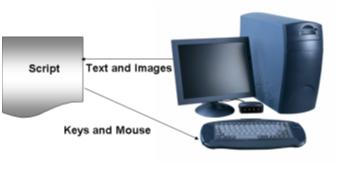
· Graphical User Interface Testing:- In this approach verification of application is done considering the behavior of    application for mouse clicks and keystrokes.Many test automation tools provide record and playback features that allow users to interactively record user actions and replay them back any number of times, comparing actual results to those expected. The advantage of this approach is that it requires little or no coding skills.However, reliance on these features poses major reliability and maintainability problems. Relabeling a button or moving it to another part of the window may require the test to be re-recorded. Record and playback also often adds irrelevant activities or incorrectly records some activities.